
Filters and Transformers
A filter decides whether a message goes on. A transformer runs a list of steps on the message, which usually reshape it, convert it between formats, or pull values out of it.
About filters
Each connector has its own filter. It evaluates a message and produces a boolean result: true means the message is accepted and continues, false means the message is filtered and stops.
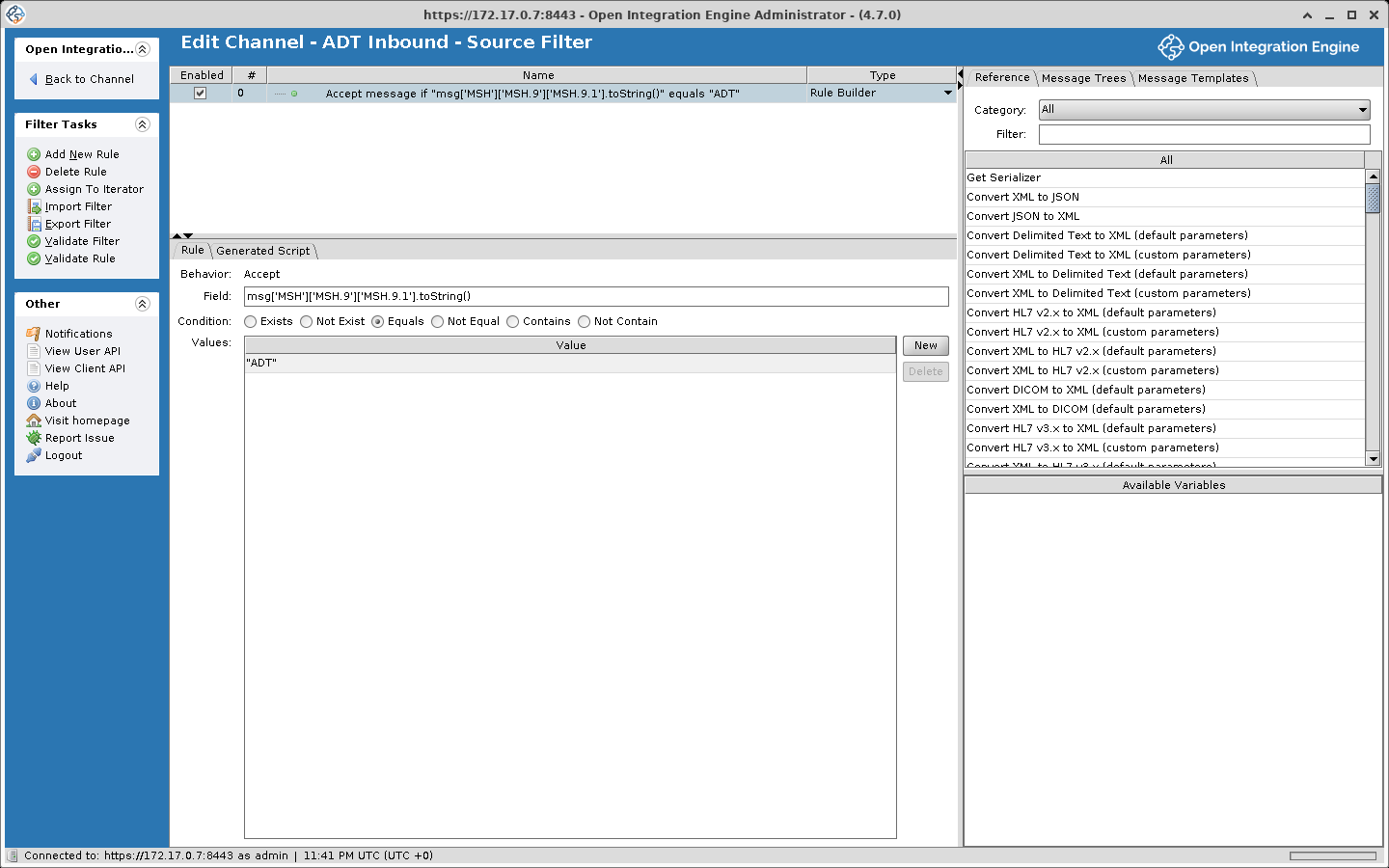
Both source and destination connectors can have filters:
- When a source filter filters a message, it never reaches any destination.
- When a destination filter filters a message, that particular destination skips it, but other destinations on the channel may still process it.
Filter rules
A filter contains one or more rules connected by operators, either AND or OR. Standard boolean precedence applies, meaning AND binds more tightly than OR. For instance:
Rule 1 OR Rule 2 AND Rule 3
is evaluated as: Rule 1 OR (Rule 2 AND Rule 3).
The "msg" object
Before a filter runs, the engine serializes the incoming message, unless its data type is Raw, and exposes it as the msg variable. Depending on the data type in use, this could be an E4X XML object, a JavaScript object, or a JavaScript string. The paths on this page assume the HL7 v2.x data type, where the parsed message is XML whose elements are named by segment, field, and component, so PID.3.1 is reached as msg['PID']['PID.3']['PID.3.1'].
Filter rule types
| Rule Type | Description |
|---|---|
| Rule Builder | A visual rule editor supporting common comparisons like equals, not equals, contains, etc. |
| JavaScript | Write custom logic in JavaScript. Return true to accept the message, false to filter it. |
| External Script | Points to a JavaScript file on the server filesystem |
| Iterator | Iterates over repeating segments or elements, applying child rules to each one |
Rule Builder example
To accept only ADT messages:
- Field:
msg['MSH']['MSH.9']['MSH.9.1'].toString() - Condition: Equals
- Value:
"ADT"
Each value is a JavaScript expression, so literal text needs quotes. An unquoted ADT is read as a variable name, and every message errors with ReferenceError: "ADT" is not defined. Values are compared as text, not as regular expressions: Equals needs an exact match and Contains a substring.
JavaScript rule example
A JavaScript rule runs inside the filter of the connector it belongs to, source or destination, with msg as the parsed inbound message. This rule assumes the HL7 v2.x data type and reads the sending facility from MSH.4.1. The rule's return value is its result: true accepts the message, false filters it.
// Accept messages from specific sending facilities
var facility = msg['MSH']['MSH.4']['MSH.4.1'].toString();
var allowedFacilities = ['HOSP_A', 'HOSP_B', 'LAB_1'];
return allowedFacilities.indexOf(facility) !== -1;
About transformers
A transformer's steps usually reshape the message, change field values, convert between formats, or pull out data for later steps. Like filters, every connector has its own.
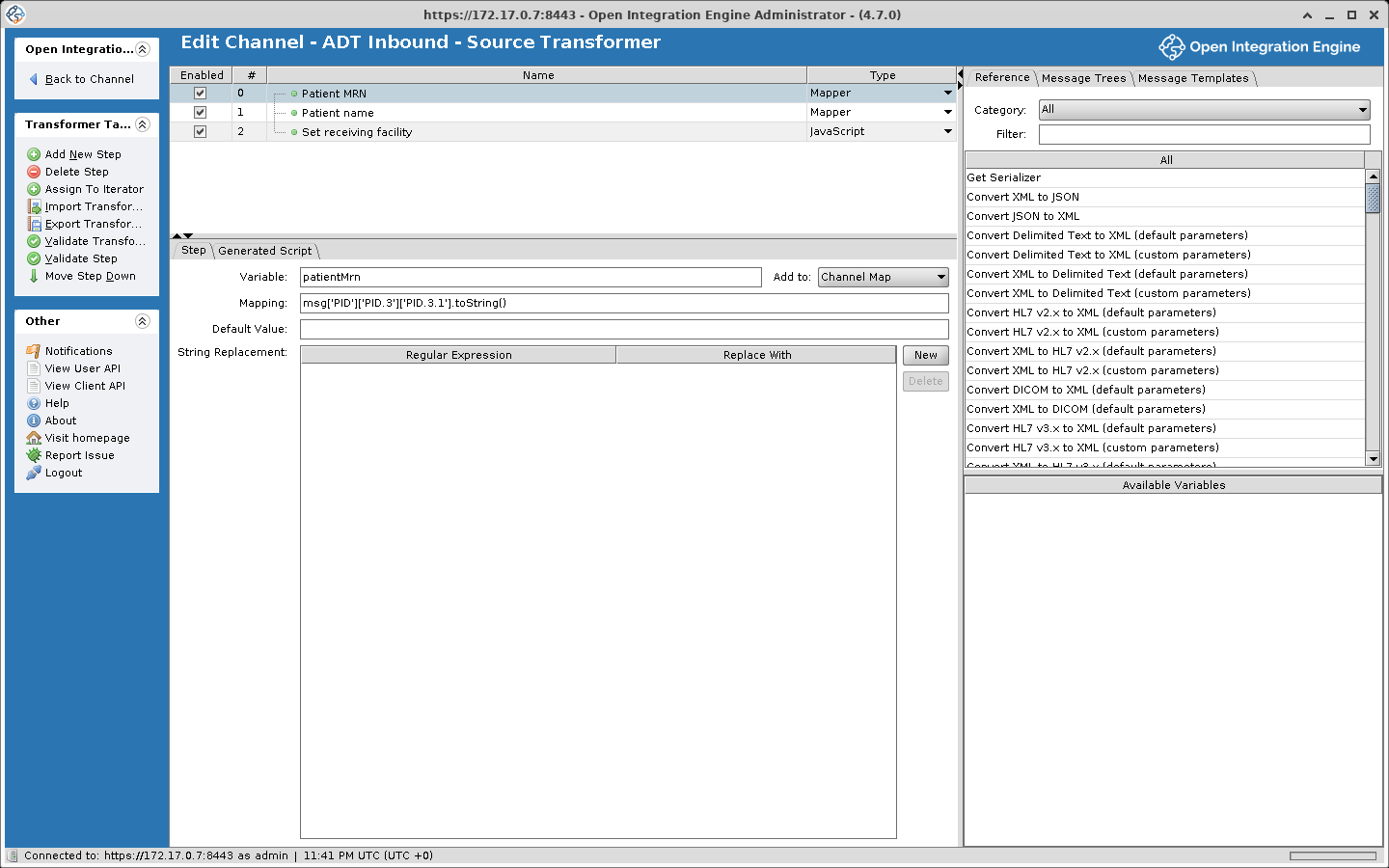
Every transformer has an inbound data type and an outbound data type. When these are the same (e.g., HL7 v2.x in and HL7 v2.x out), you are modifying a message in place. When they differ (e.g., HL7 v2.x in and JSON out), you are performing a format conversion. See Data Types and Formats for more.
A transformer is made up of steps, and each step runs as JavaScript: for example, setting a field, extracting a value, or running a script you write.
The "msg" object
msg is the same as in filters.
The "tmp" object
When a transformer has an outbound template configured, a second variable called tmp becomes available. It starts as that template, and the steps fill it in. For example, a transformer can read fields from msg (an incoming HL7 v2.x message) and place them in tmp (a JSON template), or copy only the fields it needs from the inbound message.
Transformer step types
| Step Type | Description |
|---|---|
| Mapper | Extracts a value from the inbound message and stores it as a named variable in a selected map (defaults to the channel map) |
| Message Builder | Writes a value into a field of msg or tmp |
| JavaScript | Runs a script you write |
| External Script | Loads and runs a JavaScript file from the server filesystem |
| XSLT Step | Applies an XSLT stylesheet to a specified XML source and stores the result in the channel map |
| Destination Set Filter | Removes destinations from the message's destination set, so they do not receive it (source transformer only) |
| Iterator | Loops through repeating segments or elements, executing child steps for each iteration |
Mapper step
Pulls a value from the message and saves it as a variable.
| Field | Description |
|---|---|
| Variable | The name under which the value is stored |
| Mapping | The expression to evaluate (e.g. msg['PID']['PID.3']['PID.3.1'].toString()) |
| Default Value | Fallback value when the mapping returns empty. It is a JavaScript expression, so literal text needs quotes, for example 'N/A'; an unquoted word is read as a variable name and the step errors |
| String Replacement | Regular Expression and Replace With fields applied to the mapped value. Both fields are JavaScript expressions, so quote them: '[0-9]+' and 'N'. An unquoted regular expression is a syntax error, and the channel does not deploy |
| Add to | Which map to store the variable in: Channel Map (default), Connector Map, Global Channel Map, Global Map, or Response Map |
Once mapped, the variable can be accessed in JavaScript using the corresponding map object (e.g., channelMap.get('variableName') for Channel Map scope) and in Velocity template fields (such as File Writer paths) with ${variableName}.
Message Builder step
Assigns a value to a field of msg, the message being processed, or of tmp, the outbound message.
| Field | Description |
|---|---|
| Message Segment | The target field in msg or tmp (drag from the message tree) |
| Mapping | The value to assign. Can be a literal, an expression, or a variable reference (e.g. channelMap.get('variableName')) |
JavaScript step
This step runs in a transformer with the HL7 v2.x data type on both sides and an HL7 v2.x outbound template loaded, so tmp exists and holds the parsed template. msg is the parsed inbound message. Because a template is set, the transformed message is taken from tmp, not msg. Without a template tmp is not defined and the step would write to msg instead. DateUtil is one of the utility classes the engine imports into every script.
// Reformat the date of birth on its way into the outbound template
var dob = msg['PID']['PID.7']['PID.7.1'].toString();
if (dob.length === 8) {
  tmp['PID']['PID.7']['PID.7.1'] = DateUtil.convertDate('yyyyMMdd', 'yyyy-MM-dd', dob);
}
With a PID.7 of 19800101 the outbound message carries 1980-01-01.
Iterator step
Handles repeating segments or elements:
- Set Iterate On to the repeating element path
- Add child steps (Mapper, Message Builder, JavaScript) inside the iterator
- Use the Index Variable to reach the current element
Response transformers
A response transformer exists only on destination connectors. It runs on what the destination got back after it sent, and its steps can do anything a transformer step can.
In addition to the response content itself, a destination response includes a status (e.g., SENT, ERROR), a status message, and an error message. A response transformer can change any of these. For example, a script that decides an ERROR response is acceptable can set the status to SENT.
A response transformer skips most failed sends unless its inbound data type is Raw
A response transformer runs only when the destination got a response back, or when the response inbound data type is Raw. A failed send usually has no response: a refused connection, an HTTP error with an empty body, and a JavaScript Writer script that throws all skip the response transformer, so error handling written there never runs for them.
With the response inbound data type set to Raw, the response transformer runs every time, response or not. msg is then the raw response text, so parse it yourself, for example with JSON.parse(msg) or new XML(msg).
An HTTP error status such as 500 that comes with a body is a response: the HTTP Sender stores the body as the response, so the response transformer runs whatever the data type.
Message trees
The transformer editor provides two tree views of the message structure:
| Tree | Description |
|---|---|
| Inbound Message Template Tree | Built from the inbound template, a sample message that is only a reference. A field dragged from it gives its path in msg |
| Outbound Message Template Tree | Built from the outbound template, which is what tmp starts as. A field dragged from it gives its path in tmp |
Using message trees
- Drag and drop fields from the inbound tree to create Mapper steps
- Drag and drop fields from the outbound tree to create Message Builder steps
- Clicking a field only selects it. To get its path expression, drag the field into a step or use the right-click menu
- Load sample messages to populate the tree structure
Execution order
Within one destination chain, the filters, transformers, send, and response transformer run in this order.
Source Filter Rules (in order)
    ↓ (if accepted)
Source Transformer Steps (in order)
    ↓
Destination 1 Filter Rules (in order)
    ↓ (if accepted; otherwise the chain continues with Destination 2)
Destination 1 Transformer Steps (in order)
    ↓
Destination 1 Connector sends message
    ↓
Destination 1 Response Transformer Steps (in order)
    ↓
Destination 2 Filter Rules, Transformer Steps, send, Response Transformer Steps
    ↓
Every later destination in the chain, in the same order
Destination 2 waits for Destination 1 only when the two share a chain. A destination with Wait for previous destination checked, which is the default, joins the chain of the destination above it; one with it unchecked starts a new chain, and chains run at the same time. See Destination chains. When a destination queues the message instead of sending it on the processing thread, the chain moves on at once, and the send and the response transformer run later on a queue thread. See Destination queues.